Git cheat sheet
A quick reference for Git with the most important commands and options. Read it online below, or download the printable PDF.
Download PDF
Workflow
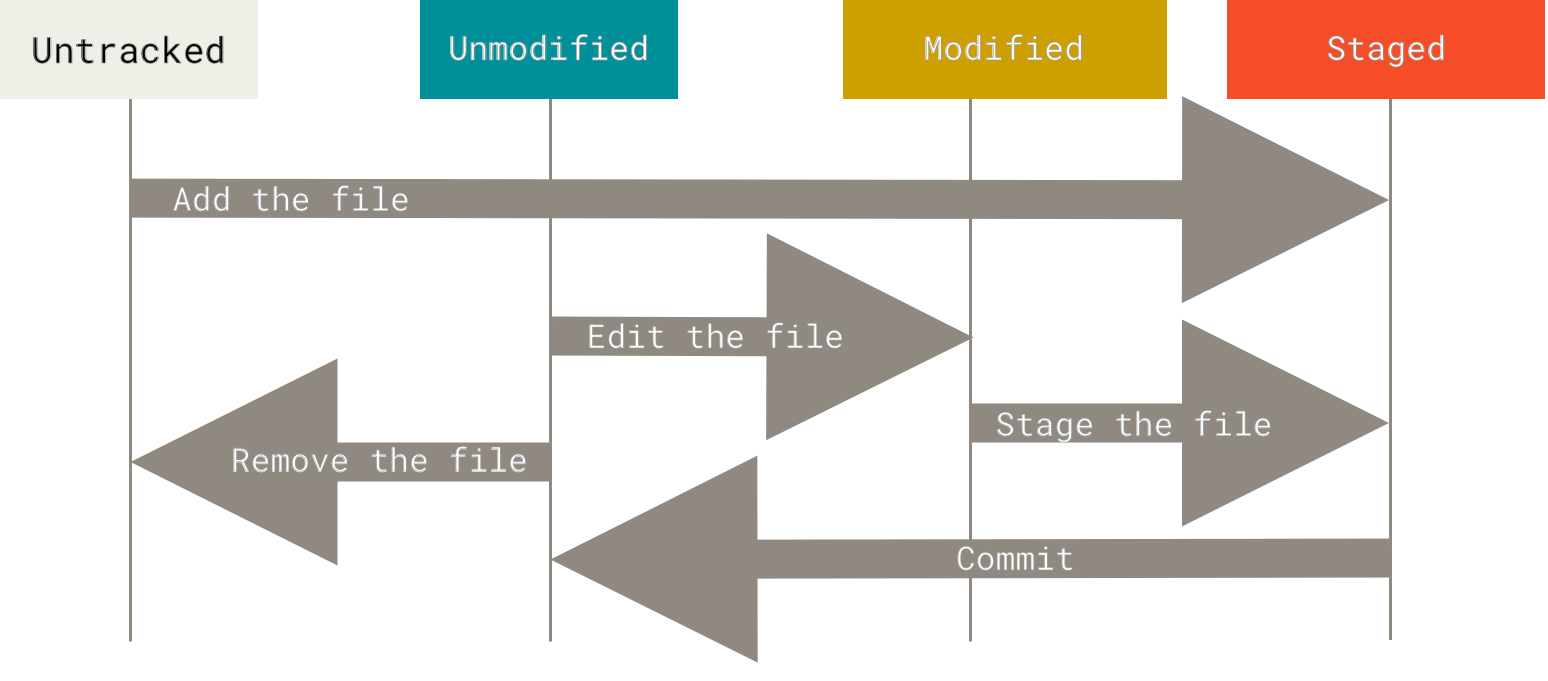
Start a new repository
| Command | Description |
|---|---|
git init |
Create a new repository in the current directory |
git clone <url> [<dir>] |
Clone a remote repository |
History
| Command | Description |
|---|---|
git log |
Show commit logs |
git log --oneline |
Show commit logs with one line per commit |
git show |
Show the changes of the last commit |
git shortlog |
Summarize git log output by author |
git blame <file> |
Show who changed which line in a file |
Local changes
| Command | Description |
|---|---|
git status |
List which files are staged, unstaged, and untracked |
git add <file> |
Add a file to the staging area |
git add -p |
Interactively choose hunks of a file to add to the staging area |
Local changes (cont.)
| Command | Description |
|---|---|
git diff |
Show unstaged changes |
git diff --staged |
Show staged changes |
git commit |
Commit staged changes using the default editor |
git commit -m <message> |
Commit staged changes with a message provided on the command line |
git commit --amend |
Amend the last commit |
git reset HEAD <file> |
Unstage a file |
git checkout -- <file> |
Discard local changes in a file |
Branches
| Command | Description |
|---|---|
git branch |
List local branches |
git branch -r |
List remote branches |
git branch <branch> |
Create a new branch |
git checkout <branch> |
Switch to a branch |
git checkout -b <branch> |
Create a new branch and switch to it |
git merge <branch> |
Merge a branch into the active branch |
git branch -d <branch> |
Delete a branch |
Tags
| Command | Description |
|---|---|
git tag |
List tags |
git tag <tag> |
Create a tag |
git tag -a <tag> |
Create an annotated tag |
git tag -s <tag> |
Create a GPG-signed tag |
git tag -d <tag> |
Delete a tag |
git show <tag> |
Show the tag data |
Collaboration
| Command | Description |
|---|---|
git remote -v |
List remote repositories |
git remote add <name> <url> |
Add a new remote repository |
git fetch <remote> |
Download all changes from a remote repository but don't integrate them |
git pull <remote> |
Download changes and directly merge/integrate them |
git pull <remote> <branch> |
Download changes and directly merge/integrate a remote branch |
git push <remote> <branch> |
Upload local changes to a remote repository |
git push <remote> --delete <branch> |
Delete a remote branch |
git push <remote> --tags |
Push tags to a remote repository |
Stashing
| Command | Description |
|---|---|
git stash |
Stash the changes in a dirty working directory away |
git stash list |
List all stashes |
git stash pop |
Apply the last stash and delete it |
git stash apply |
Apply the last stash but don't delete it |
git stash drop |
Delete the last stash |
git stash clear |
Delete all stashes |
Writing good commit messages
- Separate subject from body with a blank line
- Limit the subject line to 50 characters
- Capitalize the subject line
- Do not end the subject line with a period
- Use the imperative mood in the subject line
- Wrap the body at 72 characters
- Use the body to explain what and why vs. how