Claude Code cheat sheet
A quick reference for Claude Code with the most important commands and options. Read it online below, or download the printable PDF.
Download PDF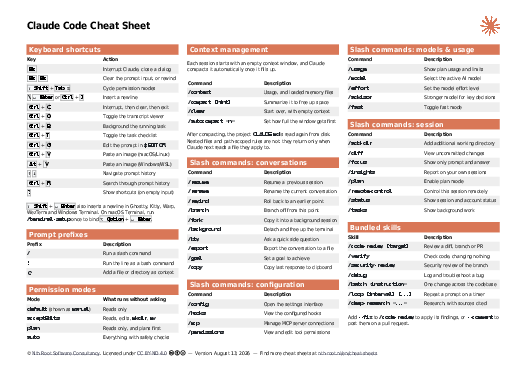
Keyboard shortcuts
| Key | Action |
|---|---|
| Esc | Interrupt Claude, close a dialog |
| Esc Esc | Clear the prompt input, or rewind |
| ⇧ Shift + Tab ↹ | Cycle permission modes |
| \ ↵ Enter or Ctrl + J | Insert a newline |
| Ctrl + C | Interrupt, then clear, then exit |
| Ctrl + O | Toggle the transcript viewer |
| Ctrl + B | Background the running task |
| Ctrl + T | Toggle the task checklist |
| Ctrl + G | Edit the prompt in $EDITOR |
| Ctrl + V | Paste an image (macOS/Linux) |
| Alt + V | Paste an image (Windows/WSL) |
| ↑ ↓ | Navigate prompt history |
| Ctrl + R | Search through prompt history |
| ? | Show shortcuts (on empty input) |
⇧ Shift + ↵ Enter also inserts a newline in Ghostty, Kitty,
Warp, WezTerm and Windows Terminal. On macOS Terminal, run /terminal-setup
once to bind ⌥ Option + ↵ Enter.
Prompt prefixes
| Prefix | Description |
|---|---|
/ |
Run a slash command |
! |
Run the line as a bash command |
@ |
Add a file or directory as context |
Permission modes
| Mode | What runs without asking |
|---|---|
default (shown as manual) |
Reads only |
acceptEdits |
Reads, edits, mkdir, mv |
plan |
Reads only, and plans first |
auto |
Everything, with safety checks |
Context management
Each session starts with an empty context window, and Claude compacts it automatically once it fills up.
| Command | Description |
|---|---|
/context |
Usage, and loaded memory files |
/compact [hint] |
Summarize it to free up space |
/clear |
Start over, with empty context |
/autocompact <n> |
Set how full the window gets first |
After compacting, the project CLAUDE.md is read again from disk.
Nested files and path-scoped rules are not: they return only when
Claude next reads a file they apply to.
Slash commands: conversations
| Command | Description |
|---|---|
/resume |
Resume a previous session |
/rename |
Rename the current conversation |
/rewind |
Roll back to an earlier point |
/branch |
Branch off from this point |
/fork |
Copy it into a background session |
/background |
Detach and free up the terminal |
/btw |
Ask a quick side question |
/export |
Export the conversation to a file |
/goal |
Set a goal to achieve |
/copy |
Copy last response to clipboard |
Slash commands: configuration
| Command | Description |
|---|---|
/config |
Open the settings interface |
/hooks |
View the configured hooks |
/mcp |
Manage MCP server connections |
/permissions |
View and edit tool permissions |
Slash commands: models & usage
| Command | Description |
|---|---|
/usage |
Show plan usage and limits |
/model |
Select the active AI model |
/effort |
Set the model effort level |
/advisor |
Stronger model for key decisions |
/fast |
Toggle fast mode |
Slash commands: session
| Command | Description |
|---|---|
/add-dir |
Add additional working directory |
/diff |
View uncommitted changes |
/focus |
Show only prompt and answer |
/insights |
Report on your own sessions |
/plan |
Enable plan mode |
/remote-control |
Control this session remotely |
/status |
Show session and account status |
/tasks |
Show background work |
Bundled skills
| Skill | Description |
|---|---|
/code-review [target] |
Review a diff, branch or PR |
/verify |
Check code, changing nothing |
/security-review |
Security review of the branch |
/debug |
Log and troubleshoot a bug |
/batch <instruction> |
One change across the codebase |
/loop [interval] [...] |
Repeat a prompt on a timer |
/deep-research <...> |
Research, with sources cited |
Add --fix to /code-review to apply its findings, or --comment
to post them on a pull request.
Installation
Install with the native installer:
curl -fsSL https://claude.ai/install.sh | bash
Then run claude doctor to verify the installation.
Starting a session
Run claude in a project directory to start an interactive session.
| Command | Description |
|---|---|
claude |
Start an interactive session |
claude "fix the tests" |
Start with an initial prompt |
claude -c |
Continue the most recent session |
claude -r |
Resume from a session picker |
claude -p "..." |
Print response and exit (headless) |
cat log | claude -p "..." |
Pipe input into a one-off query |
Useful CLI flags
| Flag | Description |
|---|---|
--add-dir <dir> |
Add a working directory |
--agent <name> |
Use a specific agent |
--effort <level> |
low to max |
--ide |
Connect to a running IDE |
--model <name> |
opus, sonnet or fable |
--permission-mode <mode> |
Start in a permission mode |
--safe-mode |
Disable all customizations |
--worktree [name] |
Run in a new git worktree |
--output-format <fmt> |
text, json, stream-json |
Useful configuration options
| Setting | Effect |
|---|---|
outputStyle |
Style of assistant responses |
cleanupPeriodDays |
Days to keep transcripts |
permissions.defaultMode |
Mode to start sessions in |
Configuration files
Settings merge from these files, later winning, except the managed one, which overrides every file and the CLI:
| File | Scope |
|---|---|
| (depends on OS) | Organization-managed settings |
~/.claude/settings.json |
User (for all projects) |
.claude/settings.json |
Project (shared) |
.claude/settings.local.json |
Project (local) |
Permission rules
Rules go under permissions, in an allow, ask or deny list.
| Rule | Matches |
|---|---|
Bash(git *) |
Any git command |
Read(./.env*) |
.env files in the project root |
Edit(./src/**) |
Any file under src/, nested too |
Edit |
Every use of the tool |
Bash in deny |
Removes the tool entirely |
Extending Claude Code
| Feature | What it does |
|---|---|
| Subagents | Run a task in its own context |
| Slash commands | Reusable prompts, by name |
| Skills | Instructions loaded on demand |
| Hooks | Shell commands on events |
| MCP servers | Connect external tools |
| Plugins | Bundle all of the above |
Subagents and slash commands live in .claude/agents/ and .claude/commands/.
Skills are SKILL.md files in .claude/skills/<name>/, where the directory
name also works as a slash command.
Memory & CLAUDE.md
| Location | Scope |
|---|---|
| (depends on OS) | Organization-wide policy |
~/.claude/CLAUDE.md |
User instructions, all projects |
CLAUDE.md or .claude/CLAUDE.md |
Shared project instructions |
CLAUDE.local.md |
Local, git-ignored instructions |
Run /init to bootstrap a file, /memory to edit.
Keep each under 200 lines; @path/to/file imports load at launch too.
Reuse an existing AGENTS.md with @AGENTS.md.
Claude's own notes live in ~/.claude/projects/<project>/memory/,
and autoMemoryEnabled: false turns them off.
Rules
Split instructions into Markdown files in .claude/rules/, or
~/.claude/rules/ to apply them to every project.
Rules with a paths: list in their frontmatter load only for matching
files. Globs (src/**/*.ts) and brace expansion ({ts,tsx}) work.
Hook events
| Event | Fires when |
|---|---|
SessionStart |
A session starts or resumes |
UserPromptSubmit |
You submit a prompt |
PreToolUse |
Before a tool runs; can block it |
PostToolUse |
After a tool call succeeds |
Notification |
Claude Code sends a notification |
Stop |
Claude finishes responding |
SubagentStop |
A subagent finishes |
PreCompact |
Before the context is compacted |
SessionEnd |
The session terminates |
Configure these under hooks in settings.json. A PreToolUse hook
is the only real enforcement point: CLAUDE.md is context Claude may
not follow, but a hook that blocks a call always blocks it.